HTC & Windows Mobile Technology

↑ Grab this Headline Animator

Saturday, January 31, 2009

Update: PocketCM Contacts v0.29

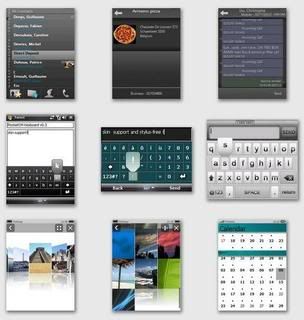
Well, it seems that there are a lot of updates on my favourite freeware apps! A new version of PocketCM Contacts was out on 25/1/09, and it's v0.29. What can we expect from this new version by tene?

What's new in 0.29? (01/25/2009)

  • Support for SMS forwarding
  • Support for sending SMS to multiple contact at once
  • Better VGA support: more usable, react better to the finger, improved Black and Dream theme
  • Big speed improvment on animation (looks nice on VGA now)
  • Speed optimization for all text rendering (smoother than ever)
  • Various fix and improvements
  • Faster SMS loading
  • Improved theme developer mode: read here


PocketCM contacts v0.29 by tene

Bookmark and Share

Update: S2U2 v1.44 by A_C

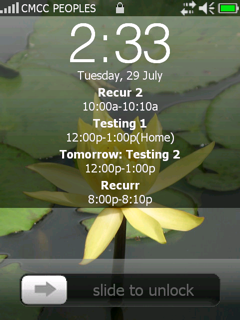
A_C has just updated S2U2 v1.44. I'm sure you've read my post about him. He's the man behind S2P, S2V & S2U2. S2U2 is a slider lock for our Windows Mobile devices. It's based on the slide lock of iphone, but is fully customizable. I've been using it since I had my Prophet & now on my Touch Pro. Excellent stuff from A_C.

S2U2 v1.44 by A_C

Changes of v1.44
================
- added one more choice when the headphone is disconnected, close both S2P & Bluetooth.
- fixed the occasional problem that the same appointment was shown twice.
- fixed the occasional double lock problem.
- fixed the occasional problem that under Power Safe mode, the device behaved weirdly when another program running in the background.
- fixed the occasional problem that the temperature was always shown as zero.
- some minor bugs fixed.

As always get it at A_C site or xda-developers to discuss any issues

Bookmark and Share

Thursday, January 29, 2009

Mozilla to release Fennec browser for the HTC Touch Pro


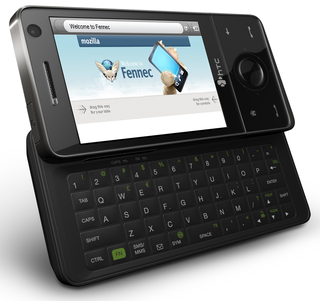
Great news for all Mozilla/Firefox & HTC Touch Pro users. Fennec - the mobile version of the popular browser Firefox, will be released in the 1st week of February, meaning next week, for our HTC Touch Pro. That is really good news! So now we have 1 of the best browsers, Firefox on the PC to our Touch pro. There might be a browser war going on after this. We PIE, Opera & now Fennec. I will give this a try on my Touch Pro & see how it compares to Opera. I don't do a lot of internet browsing on my Touch Pro nowadays. Might just settle for Opera, but if it is brilliant like Firefox, then I'll make the switch to Fennec.

Mozilla Firefox Fennec for the HTC Touch Pro


The news was picked up on 26/01 from the Fennec wiki.

Windows Mobile
We are targeting a Milestone release for the first week of February, targeting the HTC touch pro.


We are two patches away from the meta goal of building from trunk. The tools changes have review from dougt, and are waiting for review from ted, who has promised review by the end of the week. NSPR changes are waiting for review from Nelson, who asked for and received a patch against NSPR trunk


Thanks to the guys at wmexperts.com & pocketnow

Bookmark and Share

Friday, January 23, 2009

Don't Touch Me! - fun app with your G-sensor phones

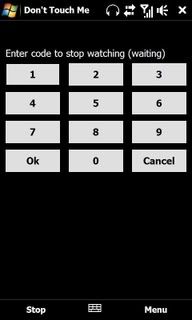
This is another application that makes use of the G-sensor of the Diamond/Touch Pro/HD. It was made by dally at, where else, xda-developers. This is essentially like a car alarm. If somebody moves your phone, then an alarm will be set off. Very cool isn't it? It's still in beta release but works fine on my Touch Pro. Only snag is that it only can use wav files as an alarm, but this is a good 1st release. It requires .net v3.5

Don't touch me! by dally for Windows Mobile, HTC Touch ProDon't touch me! by dally for Windows Mobile, HTC Touch Pro

Check it out on xda-developers or dally's site

Bookmark and Share

Customise your TF3D!

Here is a massive thread on xda-developers on themes, tweaks etc to customise TF3D. It is quite extensive. It's in the Diamond sub-forum, but can be applied to the Touch Pro as well. Go & have a look and customise your TF3D!! No screenies for this post...

Here is the thread

Bookmark and Share

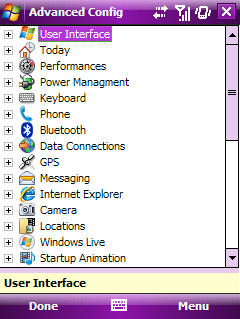
Advanced Configuration Tool 3.3 by schaps

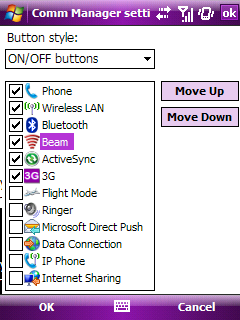
This is a must have piece of software for all Windows mobile users! It has all the tweaks needed to enhance our devices. This 3G on/off tweak needs Advanced Configuration Tool. Now this may be old news to some of you, but I went to schaps' site & found out, he has a newer version out since October 08! Version 3.3

Advanced Configuration Tool 3.3 by schapsAdvanced Configuration Tool 3.3 by schaps


Main features:

  • Extensible tweak list
  • Multi-devices support
  • Multi-languages support
  • Customize key mapping
  • Customize file associations
  • Custumize ClearType settings
  • Customize connection settings
  • Customize HTC Comm Manager
  • Customize HTC TouchFLO 3D
  • Import/export settings using provisioning XML
Changelog:
Friday, 10 October 2008 19:13
  • Fixed crash of the file browser on Samsung Omnia i900/Player Addict
  • Fixed restoration of TouchFLO 3D settings
  • Added support for non-standard TouchFLO 3D tabs
  • Added dddd-mmm-yyyy date format in TouchFLO 3D settings
  • Added HTC Task Manager tweaks
  • Added custom values for font sizes
It's jam packed, full of tweaks for our devices, it's too many to list here, 1 by 1. Get it here and see it's full features. Advanced Configuration Tool requires .net v3.5

Head on over to schaps' site for more info & download. He's also the author of FTouchSL . He's working on TouchXperience, a next generation GUI for our devices. Go on & have a look.

Bookmark and Share

Monday, January 19, 2009

AlenSW QuickMenu v2.8 - Windows style menu for Windows Mobile

Here is a program I used a lot on my Prophet. It's called QuickMenu. A new version just came out - v.28. It acts as a start menu replacement & makes the start menu like Windows PC's. Look at the screen shot & you will see it. It also has toggle menu for Wifi/BT etc. so you don't have to go through the Comm Manager. This version also has big menu option, you can play around with the menu height to get the height. Some users at xda-developers have noticed that the translation from Chinese to English was not that good or complete & they get the "squares" in place of a Chinese character. There are some versions apparently with better translation. I guess you just have to use it & find out. I recommend installing to internal memory & running it from there & ticking the option to replace start menu. After that arrange your programs link folder into folders e.g. office, entertainment, games etc, so that it looks better & saves a bit of time finding them.

AlenSW QuickMenu v2.8 - Windows style menu for Windows Mobile


Change Log:
2.8 version of the major improvements :2009-1-14
1. Increased support for WiFi (again thanks to yonsm find a good way)
2. Icon electricity use green, yellow and red color-filled
3. For non-English language environment, customizable "Settings" menu item name
4. As the "background lights" set up relatively large differences between models have been removed
5. Menu items can be set intervals to adjust the size of menu items

See here, here, here (German/English translation) & AlenSW site (in Chinese)
Bookmark and Share
Free Advertising