HTC & Windows Mobile Technology

↑ Grab this Headline Animator

Showing posts with label system. Show all posts

Friday, June 12, 2009

htcAddicts - cleanRAM v1.5


We all know with Windows Mobile, programs don't close when we press the 'x' button. Obviously with this, your RAM would be less available for other programs and making your device slow. One thing to do is to definitely close the program or open up task manager and click on the programs to close - usually all of them.

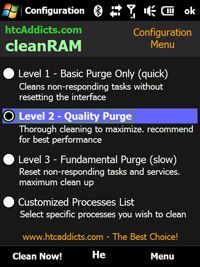
Luckily one develeoper from xda-developers and htcAddicts, ronenpg has developed cleanRAM. Newest version is v1.5. What's the difference between this and say Oxios Hibernate? For one, you can schedule when you want to free up RAM and it also offers 3 levels of cleaning.

I'm using v1.0.97 and doing ok. It does minimises the times I need to soft reset. Variable amout of RAM reclaimed each time. The new version seems to be better as with most up to date versions of software.

Give this app a try and report any bugs to the xda thread.

Description:
cleanRAM is a very useful tool for Windows Mobile 6+ devices (specially for HTC TouchFLO).
cleanRAM is a memory reclaimer similar to Oxios but with advanced settings and actually works! this applications is specially for diamond/pro devices. Great solution for the Windows Mobile memory leak problem.
cleanRAM attempts to release as much memory as possible, cleanRAM will refresh your device memory (RAM).
cleanRAM can save you a lot of SOFT RESET!


Bookmark and Share

Friday, January 23, 2009

Advanced Configuration Tool 3.3 by schaps

This is a must have piece of software for all Windows mobile users! It has all the tweaks needed to enhance our devices. This 3G on/off tweak needs Advanced Configuration Tool. Now this may be old news to some of you, but I went to schaps' site & found out, he has a newer version out since October 08! Version 3.3

Advanced Configuration Tool 3.3 by schapsAdvanced Configuration Tool 3.3 by schaps


Main features:

  • Extensible tweak list
  • Multi-devices support
  • Multi-languages support
  • Customize key mapping
  • Customize file associations
  • Custumize ClearType settings
  • Customize connection settings
  • Customize HTC Comm Manager
  • Customize HTC TouchFLO 3D
  • Import/export settings using provisioning XML
Changelog:
Friday, 10 October 2008 19:13
  • Fixed crash of the file browser on Samsung Omnia i900/Player Addict
  • Fixed restoration of TouchFLO 3D settings
  • Added support for non-standard TouchFLO 3D tabs
  • Added dddd-mmm-yyyy date format in TouchFLO 3D settings
  • Added HTC Task Manager tweaks
  • Added custom values for font sizes
It's jam packed, full of tweaks for our devices, it's too many to list here, 1 by 1. Get it here and see it's full features. Advanced Configuration Tool requires .net v3.5

Head on over to schaps' site for more info & download. He's also the author of FTouchSL . He's working on TouchXperience, a next generation GUI for our devices. Go on & have a look.

Bookmark and Share

Monday, January 19, 2009

AlenSW QuickMenu v2.8 - Windows style menu for Windows Mobile

Here is a program I used a lot on my Prophet. It's called QuickMenu. A new version just came out - v.28. It acts as a start menu replacement & makes the start menu like Windows PC's. Look at the screen shot & you will see it. It also has toggle menu for Wifi/BT etc. so you don't have to go through the Comm Manager. This version also has big menu option, you can play around with the menu height to get the height. Some users at xda-developers have noticed that the translation from Chinese to English was not that good or complete & they get the "squares" in place of a Chinese character. There are some versions apparently with better translation. I guess you just have to use it & find out. I recommend installing to internal memory & running it from there & ticking the option to replace start menu. After that arrange your programs link folder into folders e.g. office, entertainment, games etc, so that it looks better & saves a bit of time finding them.

AlenSW QuickMenu v2.8 - Windows style menu for Windows Mobile


Change Log:
2.8 version of the major improvements :2009-1-14
1. Increased support for WiFi (again thanks to yonsm find a good way)
2. Icon electricity use green, yellow and red color-filled
3. For non-English language environment, customizable "Settings" menu item name
4. As the "background lights" set up relatively large differences between models have been removed
5. Menu items can be set intervals to adjust the size of menu items

See here, here, here (German/English translation) & AlenSW site (in Chinese)

Bookmark and Share

Wednesday, January 14, 2009

PHM Regedit - trustworthy registry editor for Windows Mobile/PPC


Some of you who are just beginning to use Windows mobile/PPC or even those not techinically advanced in Windows PCs may not know how to change registry settings to apply the tweaks that I or other sites posted. Changing the registry can be dangerous if you don't know what you're doing & can screw up your PPC. So always at least back up your registry or write them down before you change the values so that you can use them again IF something goes wrong.

PHM regedit has been around for a while, 2002 in fact. It has been used a lot and still being used today because it works fine as a simple registry editor & it is free as well. I use it on my TP & Prophet.

PHM Registry editor - Trustworthy registry editor for PPC


Go here for the authors' site.
Click on download PHM regedit.
Tick that you agree to the T&C
Under Package Selection, choose "Pocket PC 2002/2003 (ARM/PXA)" for our PPC/Windows mobile touch screen devices. Do not download the Desktop installer. It will not install via active sync since our PPC's are newer & it will not install to it.
Download the file.
Then copy the .cab file to your PPC & install from there.
Then open it, check out the registry tweaks & start tweaking!!

Edit 27/04/09: Seems the author's site is down and serves me right to hotlink images as well! Images uploaded to my photobucket and I've uploaded the cab file for PHM regedit to my megaupload. Just copy the file to your device & install from there.

Bookmark and Share
Free Advertising