HTC & Windows Mobile Technology

↑ Grab this Headline Animator

Showing posts with label updates. Show all posts

Wednesday, June 24, 2009

A_C's S2U2 v2.01


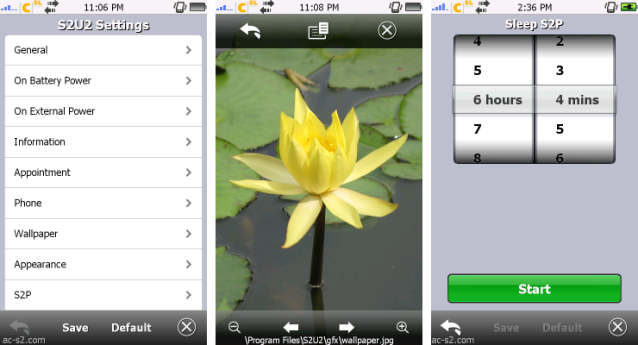
After a long hiatus (about a month?) A_C returns with an update to his very successful S2U2 application! This time it's even more impressive! One thing that was changed to v2.01 was the chance to use mp3 for the lock/unlock sound has been removed. The addition of the sleep timer to S2P (which hasn't been updated in a long while A_C!) is brilliant. I wonder whether demonizator's TPro skin will work on this new version?

Changes of v2.01
- fixed when CallerID was off, system might hang after receiving an incoming call.
- fixed the S2U2 Settings could not browse pics/files.
- reverted the sound codes (lock/unlock sound) for faster performance, but also removed the support to MP3.
- non-exist wallpaper file setting will show a black background.

Changes of v2.00
- new S2U2 Settings:
new user interface; subgrouping levels;
change/browse the wallpaper or wallpaper folder; on-screen zooming/cropping;
change/browse the lock/unlock sound (MP3 is supported for WM6 or later devices);
added sleep timer for S2P;
added save/load theme.
- more comprehensive "slide to view":
show the latest 5 missed call details (press & hold the missed call icon);
show the latest 5 active task details (press & hold the active task icon);
directly go to that unread email/SMS (shown on a pop-up) when unlock;
to dismiss a pop-up, either tap the pop-up or the corresponding notification icon.
- added emergency call function when password is enabled.
- added options to show text shadow effect.
- added option to tune the opacity of the curtains.
- added a third CallerID option - Framed.
- added option to "Always Hide the system incoming pop-up".
In the old version, the system incoming pop-up (SIP) will be disabled permanently once S2U2's CallerID is activated;
if you want to use the SIP again, the device must be soft-reset after turned off the CallerID.
With this new option set to off & soft-reset, the SIP will not be affected by S2U2's CallerID;
but a side effect - even CallerID is turned on, the SIP will be shown shortly at the beginning of an incoming call.
- localizable call waiting incoming screen.
- added InCall Volume Control.
- added option to delay the startup of S2U2 when the device is booting up.
- added support to WM6.5
only tested on the WM6.5 emulator;
when the system lock is activated, S2U2's CallerID will be temporarily disabled.
- removed PhoneNoFormat, added option "Canonical number format".
- added back the "Lock when Screen is Blank" option.
- removed option to delay the email preview, it's now done automatically.
- faster screen redraw, even on Landscape or on WVGA devices.
- increased the exception EXE list to 20 entries & moved to \HKEY_CURRENT_USER\Software\A_C\S2U2\Exceptions
- some graphics changed.
- some minor bugs fixed.

Get it here at http://ac-s2.com

Discuss it at xda-developers


Bookmark and Share

Saturday, June 20, 2009

Microfi Nitrogen 1.0


Microfi Nitrogen keeps getting better & better. Current version is 1.0.0. A real contender to S2P by A_C who seems to keeping a low profile over the last month or so.

Microfi Nitrogen is a native opensource Windows Mobile application that allows you to play MP3/OGG songs stored on your Pocket PC device. It features a file browser, full skin support, smart shuffle and repeat modes, a 10-band equalizer with preset support (8 included presets), built-in sleep mode, a blank screen command to prevent energy waste while playing music and many more new features. Nitrogen uses the MAD/OVD decoders, which are opensource. As the official releases of MAD for Pocket PC seem to be discontinued, Nitrogen uses the libraries from an opensource player (GSPlayer).

Nitrogen was build due to the lack of finger-friendly players for Pocket PC (you have to use stylus even for simple tasks). It features large buttons and you can browse among your playlist by drawing circles on the screen (using skins which support wheel component). In future releases the program will be expected to have other extensions support and more features, but such things are still being tested to ensure stability and efficiency.

Key features
:: Full MP3/OGG playback;
:: Customizable interface with skin support;
:: 10-band equalizer with 8 presets;
:: Large and easy-to-use buttons;
:: Media browser with playlist editor;
:: Large menus to perform tasks with the fingers;
:: Kinetic scrolling;
:: Smart shuffle and repeat modes;
:: Adjustable sleep timer;
:: Amazingly fast to load and to play;
:: Blank screen command to save energy;
:: Native C++ code: no need for .NET framework;
:: Extremely lightweight;
:: File association support;
:: Album art support;
:: Opensource;

Bookmark and Share

Thursday, June 4, 2009

iContact v0.94 3/06/09


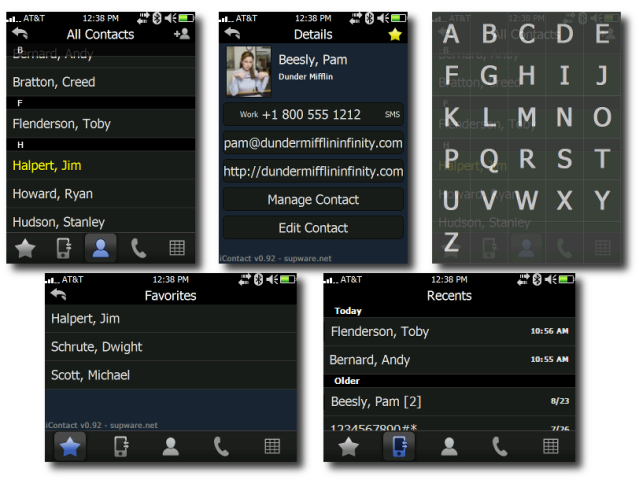
supbro has just released a new version of iContact - v0.94. In case anybody who doesn't know what it is, iContact is a finger friendly and easily customisable contact application that can replace the default Windows Mobile Contact app. If you like the app, please consider donating to supbro at the site.

Here's the full list of improvements:

[+] Added scrollbar
[+] Added "-details [oid]" command line option to jump straight to contact details
[+] Added "Create Shortcut" button to create start menu item
[+] Added "enableSensor" registry setting for touch sensor
[+] Reset Missed Call Count upon visiting -recents tab
[+] Added ability to jump to a letter using hardware keyboard
[#] Fixed bug with D-Pad + SMS
[#] Fixed clipping issue with contact names on QVGA screens
[#] Fixed bug that was forcing exit when service changed
[#] Used DeviceResolutionAware.h
[#] Fixed bug with keyboard popup on categories or details
[#] Fixed bug with Settings.exe not displaying more than 8 categories

Bookmark and Share

Tuesday, March 3, 2009

Update: S2U2 v1.50d by A_C


Man!! A_C just gets better & better. This is a massive update for S2U2. It's the most visually pleasing in my opinion. It also has a lock option as well. The graphics are smooth on animations. If you have an old version of S2U2, please please please update to this new version, you won't be dissapointed. One really cool option is that you can add you operator logo on the top left hand corner.

S2U2 v1.50d by A_C

Input Password

Change log:

Changes of v1.50d
=================
- fixed the bugs (screen freezed; clockD shifted; keys not locked) introduced in v1.50

Changes of v1.50
================
- added animated transitions.
- added Password lock, set/change the password via S2U2 Settings.
But please don't treat it as a highly secure system lock.
However, if you want S2U2 locks quicker after soft-reset,
replace the iLock2.lnk in \Windows\StartUp with S2U2.lnk (in \Windows\Start Menu\Programs\S2U2).
- added option to ask to send a busy SMS after rejected an incoming call.
The default content of the busy SMS is stored at lang.ini (make sure the lang.ini is saved in UNICODE format).
- added option to hide S2P control & album cover even S2P is running.
- added options (AppointmentLine & AlignAppointment) to change the format the Appointment info shown.
- optionally to display the operator's logo.
The logo filename must exactly match with the operator's name with PNG extension (e.g. orange.png);
it must be placed under the folder GFX\Operator;
For QVGA device, the logo has to be smaller than 16 pixels high; while for VGA, it has to be smaller than 32 pixels high.
Since there are a lot of operators in the world, only a few samples are included in the installation.
To switch back to display operator in text, delete the Operator folder & restart iLock2.
- added optional Haptic Feedback, but it may not work on some devices.
- added a flight mode icon.
- added to show the caller number property when the system found it.
- added a second-hand to analog clock.
To turn it on, the clock folder must have cs0.png ~ cs14.png.
To turn it off, remove cs0.png ~ cs14.png from the clock folder.
- added a Diamond-style clock - "clockD", but no flipping animation).
Both new clock styles are included in the S2U2ClockPack.rar.
- removed options "BlankStart" & "SafeMode" which caused confusion & malfunction in the past.
- fixed the Home key lock of Touch Diamond/Pro/HD.
- fixed the occasional problem that under Power Save mode,
the device behaved weirdly when another program running in the background (again).
- "NoPowerSuspend" now works under Power Save mode as well.
But not sure will the power be saved anymore as they are conflicting each other.
- fixed the occasional problem that the system hang at the CallerID screen.
- added CallerID support to Turkish device.
- hide "Top Curtain" will also hide the topmost grey curtain.
- added an Excel file to descrip the detail settings of S2U2.
- some graphics changed.
- some minor bugs fixed.
The longest change log of S2U2 as A_C said.

As always download from A_C here and discuss it here at xda-developers

Edit: I just noticed that the active sync icon & the time on the top, overlap, I have reported it in the xda-developers thread. Not a real problem though.

Bookmark and Share

Monday, February 2, 2009

Update: HTC Touch Pro S2U2 skin - tPRO™ v0.2.0


Demonizator, the creator of the brilliant S2U2 theme for the HTC Touch Pro has made an update on this theme. It now supports landscape mode with a proper TF3D background & working battery meter and clock while charging. Another excellent update is that all of this is conveniently packed in a cab file. See the thread on xda-developers and choose which version you want - 24h clock, am/pm or small clock. So no more copying graphics files to the pda. Be sure to stop ilock.exe, then run the cab. After that run ilock.exe and you should be set. Download the latest S2U2 to make sure this theme works properly. This theme really complements TF3D...


demonizator tPRO VGA S2U2 skin v0.2.0

Bookmark and Share

Saturday, January 31, 2009

Update: PocketCM Contacts v0.29

Well, it seems that there are a lot of updates on my favourite freeware apps! A new version of PocketCM Contacts was out on 25/1/09, and it's v0.29. What can we expect from this new version by tene?

What's new in 0.29? (01/25/2009)

  • Support for SMS forwarding
  • Support for sending SMS to multiple contact at once
  • Better VGA support: more usable, react better to the finger, improved Black and Dream theme
  • Big speed improvment on animation (looks nice on VGA now)
  • Speed optimization for all text rendering (smoother than ever)
  • Various fix and improvements
  • Faster SMS loading
  • Improved theme developer mode: read here


PocketCM contacts v0.29 by tene

Bookmark and Share

Update: S2U2 v1.44 by A_C

A_C has just updated S2U2 v1.44. I'm sure you've read my post about him. He's the man behind S2P, S2V & S2U2. S2U2 is a slider lock for our Windows Mobile devices. It's based on the slide lock of iphone, but is fully customizable. I've been using it since I had my Prophet & now on my Touch Pro. Excellent stuff from A_C.

S2U2 v1.44 by A_C

Changes of v1.44
================
- added one more choice when the headphone is disconnected, close both S2P & Bluetooth.
- fixed the occasional problem that the same appointment was shown twice.
- fixed the occasional double lock problem.
- fixed the occasional problem that under Power Safe mode, the device behaved weirdly when another program running in the background.
- fixed the occasional problem that the temperature was always shown as zero.
- some minor bugs fixed.

As always get it at A_C site or xda-developers to discuss any issues

Bookmark and Share

Monday, January 19, 2009

Update: G-Alarm v.1.4

Looks like ageye has been busy updating G-Alarm. Current version is 1.4.

G-Alarm v1.4 by ageye


G-Alarm Changelog

1.4 (2009/01/18)

  • [ADDED] Long click on the today plugin: faster editing of an alarm
  • [ADDED] Hidden option: Show flightmode
  • [FIXED] Freezing after disabling the flightmode
  • [FIXED] No more OutOfMemory exceptions
  • [UPDATED] Faster startup
  • [FIXED] Some bugs
  • [UPDATED] Languages: english, german, french, portuguese, russian, polish, korean
So head on to http://www.ageye.de/ or the xda-devs forums to get your updated versions. One of the best alarms for the PPC, free & visually appealing!

Bookmark and Share

Sunday, January 18, 2009

HTC Touch Diamond ROM update


An official ROM update from HTC for the Touch Diamond. Hopefully there will be one for our Touch Pros. Note this is only for GSM Touch Diamond version.

HTC Touch Diamond ROM update from HTC


Release Date: 2009-01-16

An updated ROM is now available for HTC Touch Diamond users to download. As always, HTC is committed to providing customers with the best possible mobile experience.

Installation Instructions:

Improved Functions and Fixes

1. When you launch the Camera while the system is working on other programs, the preview screen may become black.

2. When playing a video, sometimes a portion of the video will be cut off a little bit.

3. Fixes Audio playback problem with the speaker. Specific issues: sometimes the music will turn off and on after 10 minutes, or there is a buzzing sound or no sound at all.

4. Fixes the problem of not being able to receive MMS when in standby mode.

5. When launching music via the Music tab on TouchFLO 3D, the sound may intermittently turn off for a second and come back on.

Bookmark and Share
Free Advertising