HTC & Windows Mobile Technology

↑ Grab this Headline Animator

Showing posts with label ROM update. Show all posts

Friday, November 27, 2009

ROMeOS² [07/11] WM6.5.23081 [v3.01] for Touch Pro


Well, I've finally taken the plunge and flashed a custom ROM for my Touch Pro in the form of monx's ROMeOS. Monx caused a bit of controversy a few months back saying that he wanted to leave xda-developers and if anybody wanted his ROMs they would have to contribute to get it. This caused some uproar with members saying it's not his to 'sell' while others backed him.


Anyway, he was back on xda-developers and surprised a lot of people by offering this new ROMeOS build.

Based on 23081 build and clean. Codenamed RAnDIUM.

Flashing was easy but you would need to hardspl your Touch Pro/Fuze. Read this guide

After wards it was smooth sailing...

The ROM itself is nice! I love the fonts that come with it. It is stable and fast. There are quite a few bugs as people in the release thread and me have reported:

"This is a terrific ROM! Thank you very much for writing it.

I've seen very few problems with it so far. One issue is the text messaging popup window stating SMS/MMS sent with the Dismiss button at the bottom. That window is a little annoying and I haven't found a setting for removing it. Is there a way of removing the popup window or is this something for a hotfix?

Another issue is the icons on the top right that look like one for power, another for the speaker, a tiny clock and the signal bars/data signal type icon. The problem here is that touching the clock, speaker or power icons on my phone results in a screen indicating general status with a power percentage and the cell network being used listed at the top. While this makes sense for the power icon and/or the signal bar area, it doesn't make sense for the speaker icon or tiny clock. Also, when the status screen displays, sometimes the power percentage bar near the top of the screen is a disrupted image to the point of being unreadable. By disrupted image, I mean light colored static-like pixels in thick waves across the bar, which are sometimes different colors and other times white."


"I have a few issues on this otherwise fantastic rom.

1. when a call comes in, it takes a while for the vibration to stop after i click answer.

2. when editing an appointment using the manilla calender, the date is stuck - even when picking a new date, it still shows the old date. also the calender seems to be too big for vga - the accept/yes buttons are not seen on the screen, need to scroll down with d-pad

3. the size of manilla itself - maybe not monx's fault. the icons appear a bit cut out at the bottom. on some of my programs, the input box is cut in half because of it. sometimes everything seems aligned, sometimes not.

4. the task terminator as people have said, can only be used once - can't seem to open again when clicked for some reason. I prefer the htc task manager which drops down than this."


Monx was apparently going to release some updates for this ROM but never surfaced as yet. I'm waiting patiently since I don't like to flash another ROM and begin customisation from scratch! There are other great chefs abound in the Touch Pro thread, but I've been following threads very closely and felt that monx is the best around hence decided to flash his!


Bookmark and Share

Tuesday, September 22, 2009

Upgrade your HTC Windows Mobile phone to Windows Mobile 6.5!


Windows Mobile App 6.5 for HTC

HTC have announced that they plan on letting users of the three most recent WinMo phones upgrade to version 6.5 when it comes out. Let's check out the three phones the upgrade will be available for.

HTC Touch Diamond2

The HTC Touch Diamond2 actually does a very good job of making it so you don't have to go into standard Windows menus that often, as on top of the operating system, the interface is HTC's patented TouchFLO 3D setup, where everything is achieved through various finger swipes and sweeping gestures. It is truly intuitive, and it's the reason why the HTC Touch Diamond2 is such an unmitigated joy to use. Of course, it's not all about being pretty, a phone needs to have decent features and the HTC Touch Diamond2 has them in spades, from the 5 megapixel camera, through GPS, to incredibly fast HSDPA internet access (not to mention the superb Opera Mobile web browser). To many, the HTC Touch Diamond2 is the ultimate Windows Mobile phone and it's only set to get better when it becomes upgradable to Windows Mobile 6.5.

HTC Touch Pro2

Next up is the HTC Touch Pro2, and here, you get the added benefit of a QWERTY keyboard. However, like the previous TyTN II, with the HTC Touch Pro2, you can also tilt the screen up after sliding it open, putting it at a more natural viewing angle. In terms of other hardware, the HTC Touch Pro2 also gives you a 5 megapixel camera, HSDPA internet access (as well as WiFi), and GPS, putting it right up there in the top echelon of mobile phones. Software-wise, the HTC Touch Pro2 is powered by Windows Mobile, but, like an increasing number of Windows Mobile phones, it uses a proprietary interface on top (TouchFLO 3D, again, as with the Touch Diamond2), that takes the power of Windows Mobile, and makes it user-friendly. All in all, the HTC Touch Pro2 is one incredible mobile phone.

HTC Snap

So, both the HTC Touch Diamond2 and the QWERTY-enabled HTC Touch Pro2 will be upgradable to Windows Mobile 6.5 when it gets released. But HTC aren't stopping there; they're also letting non-touchscreen users upgrade, if they have the email-centric HTC Snap. Anyone who's used Windows Mobile before will know it's exceptionally good at emails and info management, and the HTC Snap is no exception to that rule. You get the same excellent POP3 and Exchange Server (for your corporate emails) support, but the HTC Snap also includes something new: Inner Circle. This is a new feature for the HTC Snap, that lets you set an Inner Circle of friends or important people, and automatically prioritises emails from them, to make sure you get the emails that matter the most, first.

Bookmark and Share

Monday, July 6, 2009

WM 6.5 build 21501 Titanium Neo Shadow WWE for Prophet


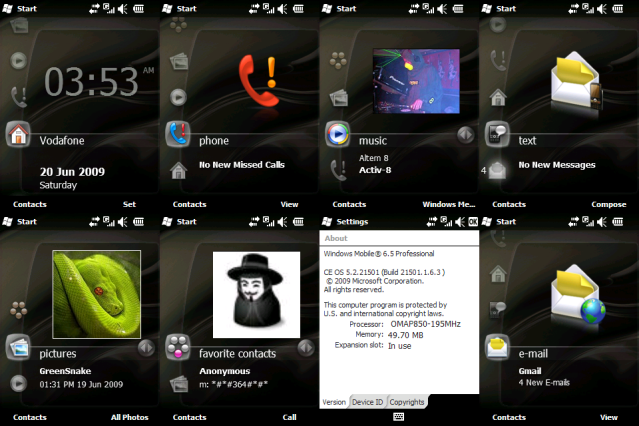
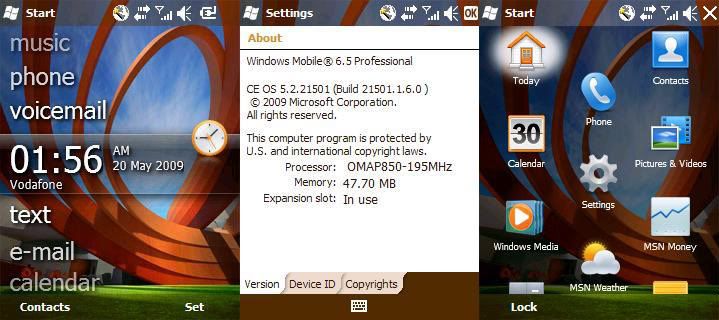
Here is a WM6.5 ROM that I am using at the moment on my Prophet. It is called Titanium Neo Shadow from wapvirus. It's based on Build 21501. It's a really nice ROM. Everything works, even wifi - but the Comm Manager is still based on WM6.1. I'm using the boa background as in the thumbnail above and it looks fantastic! If you want to test drive a WM6.5 Rom for your Prophet, try this.

Bookmark and Share

Thursday, May 21, 2009

HTC Prophet ROM: WM 6.5 build 21501 Titanium


Here is a WM6.5 ROM for our HTC Prophet. It is a newer build & not based on a Chinese WM6.5 ROM. wapvirus cooked this ROM and from the reviews in the thread, it seems reasonably quite fast on the device. I have not had the chance to try it out yet on my Prophet. Will give it a try over the weekend. This is considered a clean build. There seems to be a problem with wifi not switching off. Some other problems reported but fixed are the ringtones not available and sms not able to reply.

Sorry about the image being too squashed, i had to resize it.

Bookmark and Share

Sunday, April 12, 2009

Official HTC Touch HD/Blackstone v1.56.405 (UK WWE) & Europe v1.56.401


HTC Touch HD

HTC has released a new ROM for the Touch HD. Seems that it is faster & GPS has improved in this new ROM according to xda-developers members. There are quite a few versions according to where you bought your device and the clever guys at xda-developers have found some serial tweaks to enable you to download them at the HTC site, which requires a valid s/n. I don't think you need hard-spl for this, since it is an official ROM update, and the guys at xda-developers has warned to use stock SPL for this update or else your graphics would be screwed up!

Taken from xda-developers thread:

Serial tweak - thx to pw120
v1.56.401 - Europe - HT849KD07000
v1.56.402 - Czech republic - not supported
v1.56.403 - Danish - HT846KD02228
v1.56.404 - Dutch - HT849KD01000
v1.56.405 - UK (WWE) - HT849KD07500
v1.56.406 - French - HT849KD04000
v1.56.407 - German - not supported
v1.56.408 - Italian - HT846KD05500
v1.56.409 - Norwegian - HT846KD04000
v1.56.410 - Portuguese - HTxxxxxxxxxx
v1.56.411 - Polska - not supported
v1.56.412 - Spanish - not supported
v1.56.413 - Swedish - HT848KD02000
v1.56.414 - Finnish - HT846KD05000

HTC Touch HD ROM Upgrade (EU)
Release Date: 2009-04-07

An updated ROM is now available for HTC Touch HD users to download. As always, HTC is committed to providing customers with the best possible mobile experience.

Installation Instructions:
[The update is available for the following languages: English (Pan Europe and UK), Italian, Dutch, French, Finnish, Portuguese, Danish, Norwegian and Swedish.]
Improved Functions and Fixes
1. Updated the Connection Setup Database.
2. Improved emergency call connections while using Airplane Mode.
3. The GPS position updating speed has been enhanced.
4. A Title bar display flicker in TouchFLO 3D has been corrected.
5. Fixed multiple browsing issues.
Installation Instructions:

Before you proceed, please confirm that this software upgrade is a newer version than what is currently installed on your device. If it is the same version and your device is operating normally, there is no need to reinstall the software.

To check what version is installed on your device, click Start > Settings > System tab > Device Information > Version tab, and note the ROM version, CPU, and Radio version.

Warning!

* This is a generic software update. Any additional software or settings provided by your mobile operator or company will be lost. If you require this customization, please contact your supplier first before upgrading.
* Please note that this upgrade will erase any data stored on the device. Once you proceed with the upgrade, the system can not be downgraded again.
Please back up your data first before upgrading your device. Before you run the ROM Upgrade Utility (RUU), make sure you check and do the following:
* The USB sync cable is connected to your device and PC. If your PC is running Windows XP®, ActiveSync® will run automatically to establish a connection. If your PC is running Windows Vista™, then Windows Mobile Device Center will establish the connection between your device and PC.
* All running applications on the device have been closed.
* Make sure that the battery level of the device is at least 50%. To check, tap Start > Settings > System tab > Power.
* The update will take up to 30 minutes, DO NOT interrupt the update process, make/receive phone calls, disconnect the device from the PC, or press any buttons until the process has been completed.
Once the RUU is downloaded, launch the application on your PC and follow the instructions.


Bookmark and Share

Tuesday, March 3, 2009

HTC Prophet ROM Sprint Manila(OS 5.2.21015)


It's been ages since I've posted anything related to my Prophet. I think now is the time. Varanusvincent over at xda-developers have cooked a new ROM for the Prophet based on the 5.2.2.21015 ROM of Iolite which was made possible by Lamson of PDAVIET (another great HTC site, shame it's not in english, it's in Vietnamese)


Features :

*OS 5.2.21015. Thanks to Lamson from PDAVIET
*ArcSoft MMS 5.0.31.19
*ClearTemp 1.0.1 by Vicott Wong
*Oxios Hibernate 1.40 by Oxios.com
*PIMBackup 2.8.0.0 by FdcSoft
*SIM Manager 6.57
*Group SMS
*Camera Album
*Audio Manager
*Network Wizard for PocketPC v1.0 (Build 29982.1.0.1.7)
*Pocket RAR
*Registry Editor
*Advanced Configuration Tools
*New Icons
*Vista Blue Wait Cursor
*Netframework 3.5
*Bluetooth FTP
*Bluetooth Print
*Bluetooth SAP
*Support Chinese
*PCM Keyboard included with Dream Skin and German Layout also included


As usual, to try a cooked ROM, you need HardSPL. Cloudyfa (another great chef for Prophet) has made a guide to upgrade via Vista. I'm downloading as we speak to upgrade my prophet from LF Extreme Blue V2.

Bookmark and Share

Tuesday, February 17, 2009

Official HTC Touch Pro ROM Upgrade WWE 5.05.405.1


It's finally here! The official HTC Touch Pro ROM Upgrade that I mentioned in this post is finally here. Went a look at the HTC website yesterday & it was there. I have not had a chance to upgrade yet, because I've made this post while at work! I'm working till 10pm today, so might leave it till then or tomorrow night.

The version is the same as reported in the leaked ROM, but packaged differently.

RUU_Raphael_HTC_WWE_5.05.405.1_R_Radio_Signed_Raphael_52.58.25.30_1.11.25.01_Ship.exe

Improved Functions and Fixes
1. The display of TouchFLO 3D sometimes may appear cracked.
2. When taking a picture, the auto focus function may malfunction in some circumstances.
3. In some circumstances, the preview screen will become black after taking picture.
4. In some circumstances, the device may hang while loading TouchFLO 3D.
5. When hanging up a phone call, there may be a delay in the display response.

Get it here on the HTC site or you guys can download it via megaupload. You would need your S/N if you go to the HTC site. It is located underneath your battery.

Tell us how this improved your device in the comments section

Bookmark and Share

Sunday, February 8, 2009

A new ROM for the HTC Touch Pro soon?


What is this I stumbled upon on xda-developers? Looks like a new ROM would be available to our Touch Pro's/FUZE etc soon!

HTC Touch Pro leaked WWE ROM

Windows Mobile: 6.1 Pro (5.2.20764.1.4.3)

ROM Version : 5.05.00.00 (5.05.405.1 WWE)
ROM Date : 01/22/09
Radio Version: 1.11.25.01
Protocol Version: 52.58.25.30U

This new ROM was leaked by a guy funnily using the name __htc__. Seems like there are some improvements made, like new radio ROM & faster, more responsive pda-phone. There are still reports that this ROM still contains the dreaded GPS lag - which I have not had to be honest. Forumer are saying that there is no keyboard lag after sliding, TF3D is faster & apparently better 3G signal. Also mentioned is that the camera is a bit laggy as well. Seems to have better battery life according to reports.

At the moment it's WWE (worldwide english) and FRE (French) only according to __htc__. Once it's official, there will be others available.

Australian users have an update already! You need to put your S/N to get this update. Have not tried with mine, since I'm waiting for the UK version since I bought it from Clove.co.uk

I have not flashed this ROM yet, still waiting for the official WWE - if there are updates to be made for this version ROM. Also I use my Touch Pro a lot obviously, don't have much time to fiddle with a new ROM now. Of note I have done HardSPL by Olinex - which you will need to have to use custom ROMS, but not official ROMS from HTC.

Here's the link to the new Radio ROM: http://www.megaupload.com/?d=YARH7DNT
Here's the link to the NEW ROM: http://www.megaupload.com/?d=HYSKRKKC

Original xda-developers thread

Disclaimer: I would suggest to wait for a proper release from HTC, but if you want, you can try this ROM out. Report any bugs in the xda-developers thread above. HardSPL is recommended.

Bookmark and Share
Free Advertising