HTC & Windows Mobile Technology

↑ Grab this Headline Animator

Sunday, January 31, 2010

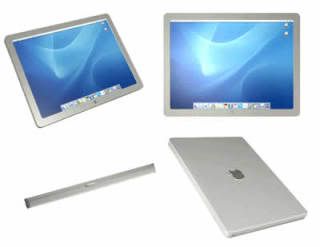
5 Reasons Why The iPad Fails To Impress

Apple's Ipad


On January 27th Steve Jobs unveiled Apples latest "it" product, the iPad. Essentially the iPad "fills the gap" in between smartphones and laptops. One question remains to be answered, is there a need for a device to bridge the gap in between the two technologies? We're not sure yet, but there is one thing we know, the iPad has some issues... below are 5 of the most glaring.

1.) The Name
Numerous names were being thrown around in the months/weeks leading up to the release (iTablet, iSlate, iPad) but which name was Apple going to choose? I had grown accustomed to referring to the device as the iTablet, I could even see calling it the iSlate… but iPad never seemed quite right. Why would Apple want to name their new product something that sounds so familiar to the iPod? Some people are objecting to the name referring to it as the "iTampon".

2.) No Multitasking
Are you serious... who thought this was a good idea? How can the iPad even compete with Netbooks if you can’t multitask? This means that if you're writing a document you can't listen to music, you can’t have TweetDeck open if you want to check your email, you can only do one thing at a time, which has always been a complaint with the iPhone.

3.) No Camera
Why is there no camera on the iPad, front or back? It's got a microphone… but no camera. Look at the size of the case that surrounds the screen, there is ample space for a camera. The iPad should've at least came with a 3-megapixel camera built in. As it stands, this means no iChat/Skype chat for you. Good move Apple, good move.

4.) Huge Ridiculous Adapters
Want to access your camera or plug in something USB… well there’s an adapter for that, actually 2 separate adapters both excessively huge.

5.) Same Touch Keyboard
The iPad needed to re-revolutionize the keypad for touchscreen devices, make it easier to use. So what did we get... just a larger version of what we already had. It’ll be incredibly hard to type on, unless you're lying flat with your knees holding the device up, or you buy the iPad Case (essentially an book cover).

BONUS: No Flash (We just couldn't stop at 5)
Most of us are probably accustomed to Apple devices not being Flash compatible, but if Apple is truly wanting to compete with other Netbooks they need to remedy this. With a larger screen comes more responsibilities, i.e. you can't just leave gigantic holes in the middle of webpages if you claim it to be "the best web experience you've ever had".

The iPad is still in its infancy, so we're sure that it'll get better with time. Only time will tell if Apple's iPad will be a success or an iFlop.

Bookmark and Share

Monday, December 28, 2009

Windows Marketplace available for Windows Mobile 6.0 & 6.1

Windows Marketplace is now available to Windows Mobile 6.0 & 6.1. I got this news in my email on Christmas Eve. Windows Marketplace is still in its infancy in my opinion and there are some limitations according to regions -  not sure if it's the same for the Apple App Store. Why would Microsoft limit their customers is beyond me. Also some of the apps are too expensive. Pac Man for $10.69 and Kinoma Player for $40! Anyway, that's just my opinion...

Go &; download Windows Marketplace for your Windows Mobile 6.0 & 6.1 now


Get it here

Bookmark and Share

Thursday, December 24, 2009

50% off SPB software until 30/12/2009

50% off SPB softwares!

It's been a while since I posted anything here. Since the last post, I've moved house and things have not settled 100% since then. Today it's Christmas Eve and I'm working till 10 pm tonight. Seeing that it's not busy (It's xmas eve!!) I've decided to make this post.

SPB software is offering a 50% discount on most of it's softwares, including the ever popular Mobile Shell! For this period only, it's half price at $14.95!

Just type "SPBHolidayDiscount" in the discount code on checkout.

Better hurry! Offer until 30/12/2009!


Bookmark and Share

Friday, November 27, 2009

ROMeOS² [07/11] WM6.5.23081 [v3.01] for Touch Pro


Well, I've finally taken the plunge and flashed a custom ROM for my Touch Pro in the form of monx's ROMeOS. Monx caused a bit of controversy a few months back saying that he wanted to leave xda-developers and if anybody wanted his ROMs they would have to contribute to get it. This caused some uproar with members saying it's not his to 'sell' while others backed him.


Anyway, he was back on xda-developers and surprised a lot of people by offering this new ROMeOS build.

Based on 23081 build and clean. Codenamed RAnDIUM.

Flashing was easy but you would need to hardspl your Touch Pro/Fuze. Read this guide

After wards it was smooth sailing...

The ROM itself is nice! I love the fonts that come with it. It is stable and fast. There are quite a few bugs as people in the release thread and me have reported:

"This is a terrific ROM! Thank you very much for writing it.

I've seen very few problems with it so far. One issue is the text messaging popup window stating SMS/MMS sent with the Dismiss button at the bottom. That window is a little annoying and I haven't found a setting for removing it. Is there a way of removing the popup window or is this something for a hotfix?

Another issue is the icons on the top right that look like one for power, another for the speaker, a tiny clock and the signal bars/data signal type icon. The problem here is that touching the clock, speaker or power icons on my phone results in a screen indicating general status with a power percentage and the cell network being used listed at the top. While this makes sense for the power icon and/or the signal bar area, it doesn't make sense for the speaker icon or tiny clock. Also, when the status screen displays, sometimes the power percentage bar near the top of the screen is a disrupted image to the point of being unreadable. By disrupted image, I mean light colored static-like pixels in thick waves across the bar, which are sometimes different colors and other times white."


"I have a few issues on this otherwise fantastic rom.

1. when a call comes in, it takes a while for the vibration to stop after i click answer.

2. when editing an appointment using the manilla calender, the date is stuck - even when picking a new date, it still shows the old date. also the calender seems to be too big for vga - the accept/yes buttons are not seen on the screen, need to scroll down with d-pad

3. the size of manilla itself - maybe not monx's fault. the icons appear a bit cut out at the bottom. on some of my programs, the input box is cut in half because of it. sometimes everything seems aligned, sometimes not.

4. the task terminator as people have said, can only be used once - can't seem to open again when clicked for some reason. I prefer the htc task manager which drops down than this."


Monx was apparently going to release some updates for this ROM but never surfaced as yet. I'm waiting patiently since I don't like to flash another ROM and begin customisation from scratch! There are other great chefs abound in the Touch Pro thread, but I've been following threads very closely and felt that monx is the best around hence decided to flash his!

Bookmark and Share

Wednesday, November 25, 2009

30-50% off BodyGuardz & ZAGGskins

Received these offers in my email a few days back.

ZAGGskins, from the makers of Invisible Shield, have 50% off for Thanksgiving from 24-30th November.

Visit ZAGGskins now


BodyGuardz is also having an offer on their products:


BodyGuardz 30% off Black Friday offer

Visit BodyGuardz now

Bookmark and Share

Monday, November 16, 2009

Ivy the Kiwi? Coming soon to Windows Phone

I saw a post made at Mobile Tech World about Ivy the Kiwi? Thinking that it is about New Zealand, I clicked on it, and saw a video about this awesome new game for Windows Phone! It is by the co-creator of Sonic the Hedgehog.

Man it looked really interesting. Ivy moves forward and you use your stylus to draw/make these vines to direct her. It reminds me of Numpty Physics. Looks really interesting. Wait for it in the Windows Phones App Store.

Have a look at this cool video.


Bookmark and Share

Friday, November 13, 2009

10 Free Graphics programs for Windows Mobile

If you are a Windows Mobile Pocket PC User then this post is just for you. Here I'm going to share most popular Graphic Application softwares with direct download link to my readers. Hope you will like it.

Ρhotos2Resize v2.0.1

An easy to use image resizing tool for free is just what the world needs when the digital camera revolution is here. Now when storagecard is cheap, it is great to be able to use the Pocket PC as a mobile Ρhoto album. With this software you can batch process all your digital camera Ρhotos from your PC to your PDA.

Ρhotos2Resize v2.0.1

Download Ρhotos2Resize v2.0.1

JPeg2Pdf v1.01

JPEG2PDF allows to create ----- albums in pdf format, starting from jpeg pictures. All this directly from you PDA! JPeg2Pdf is a must have application for all the lovers of digital photography.

Photos2Resize v2.0.1

Download JPeg2Pdf v1.01

AB Draw Lite 2.0

AB Draw is a Pocket PC application which allows you to draw using basic shapes (lines, rectangle, ellipses and text). The documents are stored in Scalable Vector Graphics (SVG) format (http://www.w3.org/Graphics/SVG/). This is a XML standard for storing graphics.

AB Draw Lite 2.0

Download AB Draw Lite 2.0

Image Stack v1.0

Show your favorite digital pictures with your Pocket PC to your friends. When meeting with friends, how do you pass around your digital images? It's easy when printed on paper, but jpegs? If you have a mobile device with Windows based Pocket PC 2003, you can pass around this:
- Open the image folder.
- Your friends can shuffle through all pictures just by pressing the left arrow key.

Image Stack v1.0

Download Image Stack v1.0

Screen Capture v1.0.0.1

Capture the Mobile screen and store it in an bitmap file. Two types of capture are available one is automatic capture based on timer and another is manual capture based on hardware key assigned by the User.

Screen Capture

Download Screen Capture v1.0.0.1

ShortCAD

ShortCAD is a free software for Pocket PC that reveals the simplicity of well known CAD products just onto the palm of your hand! ShortCAD brings basic concepts of drawing creation to your Windows Mobile system.

ShortCAD

Download ShortCAD

S2V v0.20

S2V is a stylus-free picture viewing application. It can also be used to set up the wallpapers for S2U2 (0.97 or later).

S2V v0.20

Download S2V v0.20

Image Explorer LE

Open image files with ease using Image Explorer. Supported file formats are Windows Bitmaps (2bp, bmp), all GIF formats (gif), standard and progressive encoded JPEGs (jpeg, jpg, jpe) and X-Windows bitmaps (xbm).

Image Explorer LE

Download Image Explorer LE

PocketPicture v2.2

PocketPicture v2.2 is a new version of the popular free graphic editor for PocketPC. PocketPicture allows you to turn your pocket PC into canvas and easel and be creative everywhere. It is useful to draw small icons as well as painting or editing rather big images (scrolling and zooming is supported).

PocketPicture v2.2

Download PocketPicture v2.2

Blender Pocket v2.42

Blender Pocket is a port of Blender (complete open-source 3D package) for Pocket PC. It is for 3D modeling, animation, rendering, post-production. It requires some time to learn but its possiblities are unlimited! For people wanting to make 3D everywhere, Blender Pocket is for you.

Blender Pocket v2.42

Download Blender Pocket v2.42

Have fun with these free graphics programs!

Bookmark and Share
Free Advertising